BACnet Router | Embedded Software
Simplifying complex industrial networking for everyone
Our team developed embedded software that aimed to position our new IoT device as a market leader by making complex network configuration accessible to both novice and power users.
By bridging the gap between expert-level engineering and a unique user-friendly GUI, we transformed a technical necessity into a competitive advantage.
The challenge
The IoT device was moving toward production at high speed, but it was missing a vital component; the now BACnet Router software.
We had very little time, so I had to find new ways of working with the engineering team.
A high level of ambiguity meant that we had to build the plane while flying it.
What is a BACnet Router?
BACnet is a “language” that most modern industrial devices, ranging from air conditioners to gas sensors, use to communicate. These devices require seamless communication with each other and the building management system.
The BACnet Router helps connect all these devices and helps them understand each other's different “dialects”.
Step 1: Aligning a fragmented team around a shared vision
First, I conducted a workshop to help our new team get aligned and define our 'North Star' and product goals early to avoid any misalignment that might cost us valuable time. This strategic groundwork ensured that Engineering and Design could easily work in parallel.
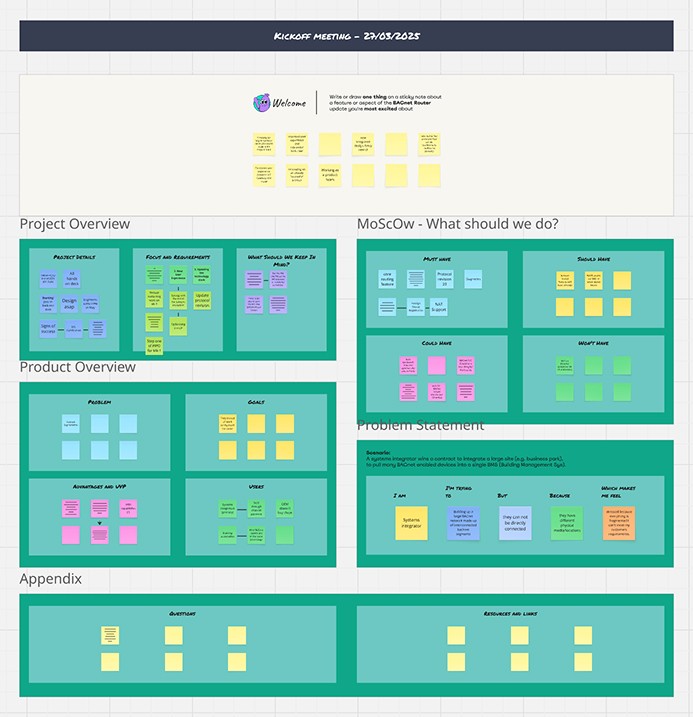
Our kickoff workshop Miro board
🧭 Outcomes of the workshop
This workshop was a tool to help product management and engineering have really important conversations and make critical decisions that will move us towards success.
I will work in parallel with the engineers by rapidly redesigning the user experience and GUI in a way that engineering could begin building it the back-end infrastructure as we learn more.
The new UI had to be simple, easy to use, and pilot the organisation's new design system.
👤 Problem statement
“I'm a Systems integrator (technician). I'm trying to set up a large BACnet network in a business park, which is made up of interconnected BACnet segments.
But they can’t be directly connected to each other or the BMS because they have different physical media and locations. This makes me feel stressed because everything is fragmented, so I can't meet my customers' requirements.”
Step 2: Evaluate the legacy system and technical constraints
There was a rudimentary BACnet Router tool we could use to reverse-engineer a solution more quickly. It was obsolete and very difficult to use, but it proved that users loved having a GUI, which many competitors didn’t have at all!
I audited the legacy interface alongside the engineering team to find opportunities for improvement and visualise complex technical workflows.
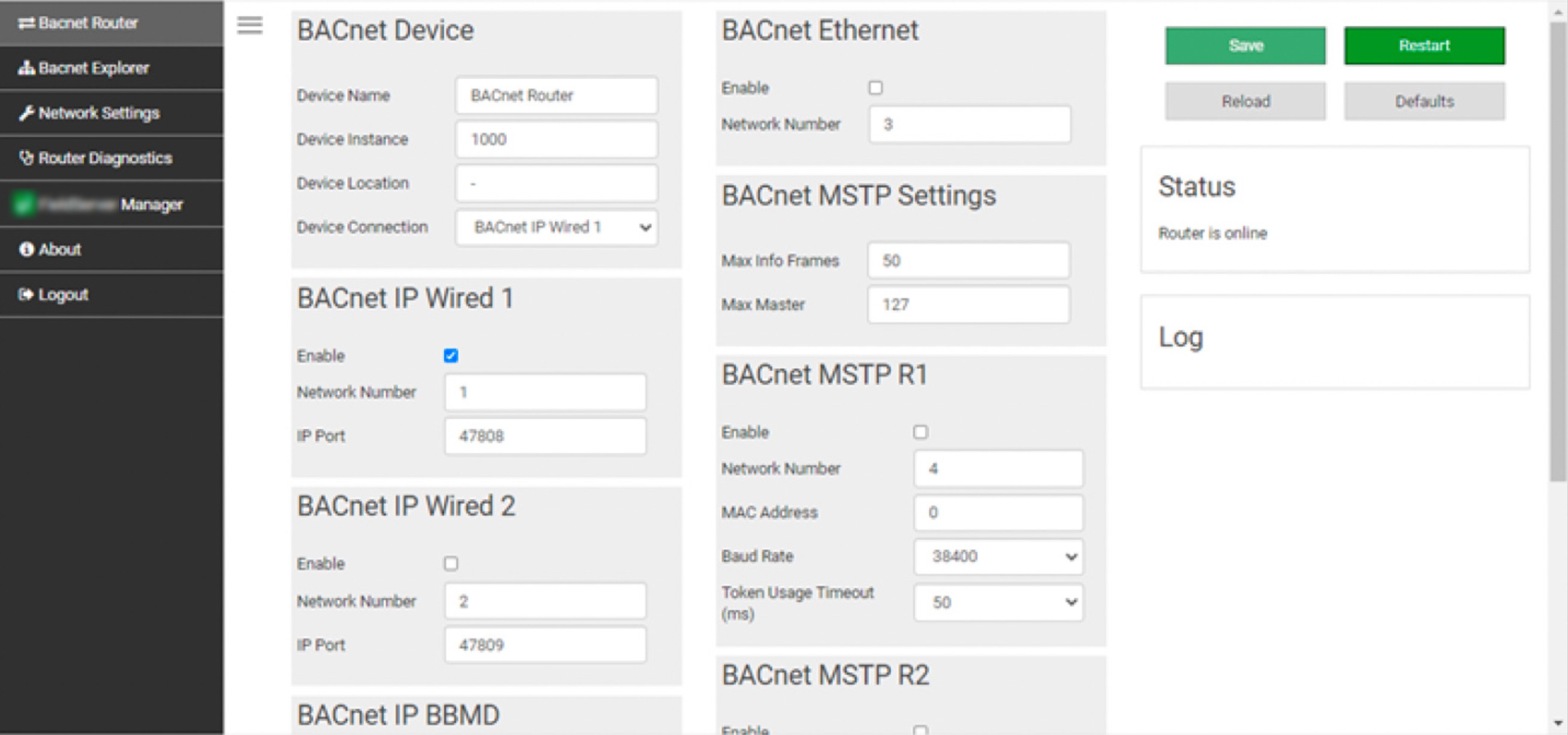
The legacy BACnet Router's user interface.
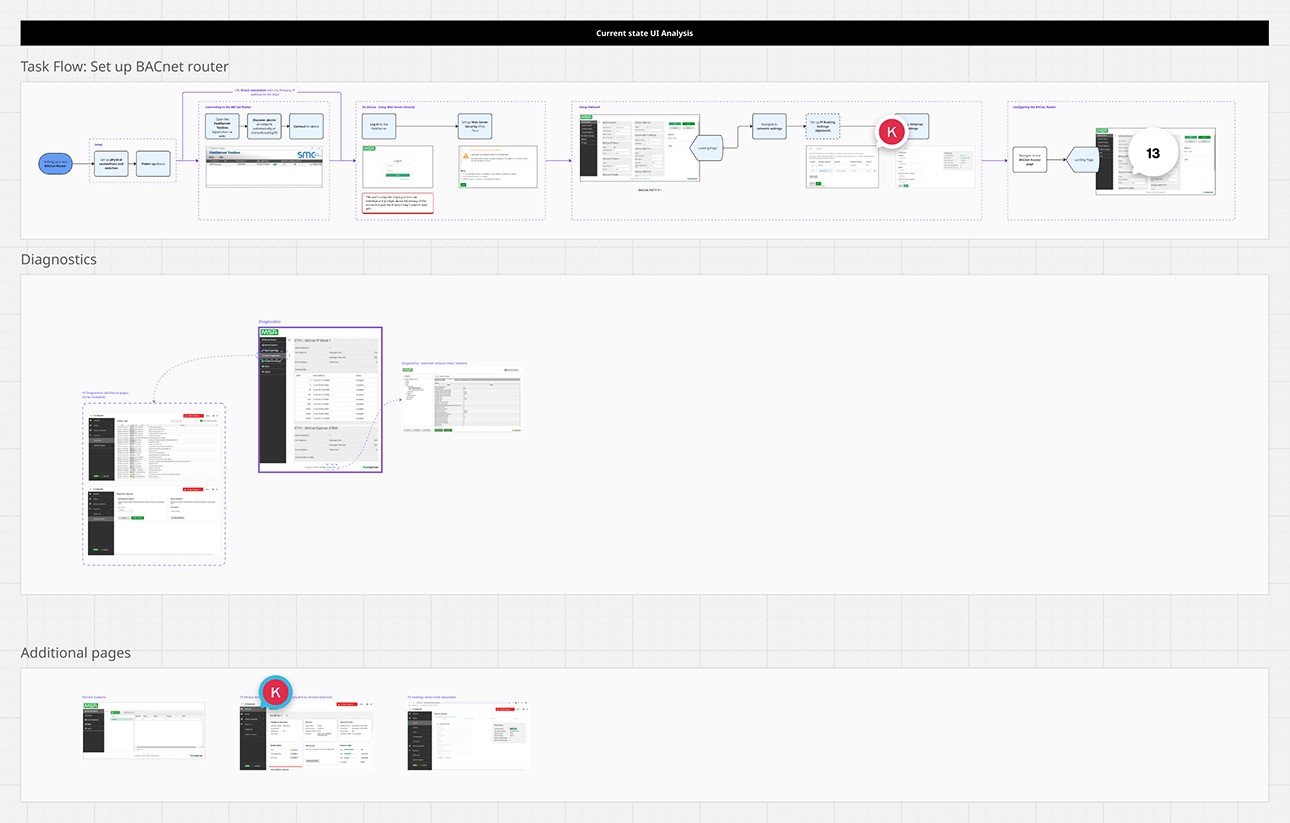
User flow analysis of the legacy interface.
👍 Pros
👎 Cons
Users need to compare values to ensure everything works, so having the right ones visible was helpful.
All the settings were squeezed onto a single page, which made the page non-responsive, severely impacting cognitive load
There was no affordance to guide users on what to do on the Graphical User Interface (GUI).
There was no diagnostic tool to help users fix configuration issues.
Design methodology
⏳ Managing tight deadlines
We had a high degree of ambiguity which would only become clearer later. So I took the risk of creating a design that might change slightly over time to ensure that we achieve our goals on time.
Created a scalable, flexible design that’s “just good enough” to serve as a foundation that engineers can expand on as they get more clarity about details like which settings were required or which features to build first.
Designed hand-in-hand with engineers to iterate with the help of their rich experience with the product and customers.
🧭 Design decisions
Use and expand on the organisation's new design system to create synergy and speed up development.
Make the interface user-friendly for novice users by guiding them through the different workflows and making objects explicit while ensuring that power users can still complete actions quickly.
Keep the user interface simple to reduce cognitive load.
Step 3: Design mockups
Industrial networking is notoriously complicated. Most technicians just want to complete the configuration, install the device, and forget about it for a decade.
I focused on removing that cognitive burden by letting the system guide the user through the setup—transforming a technical necessity into a streamlined workflow that serves both entry-level installers and power users.
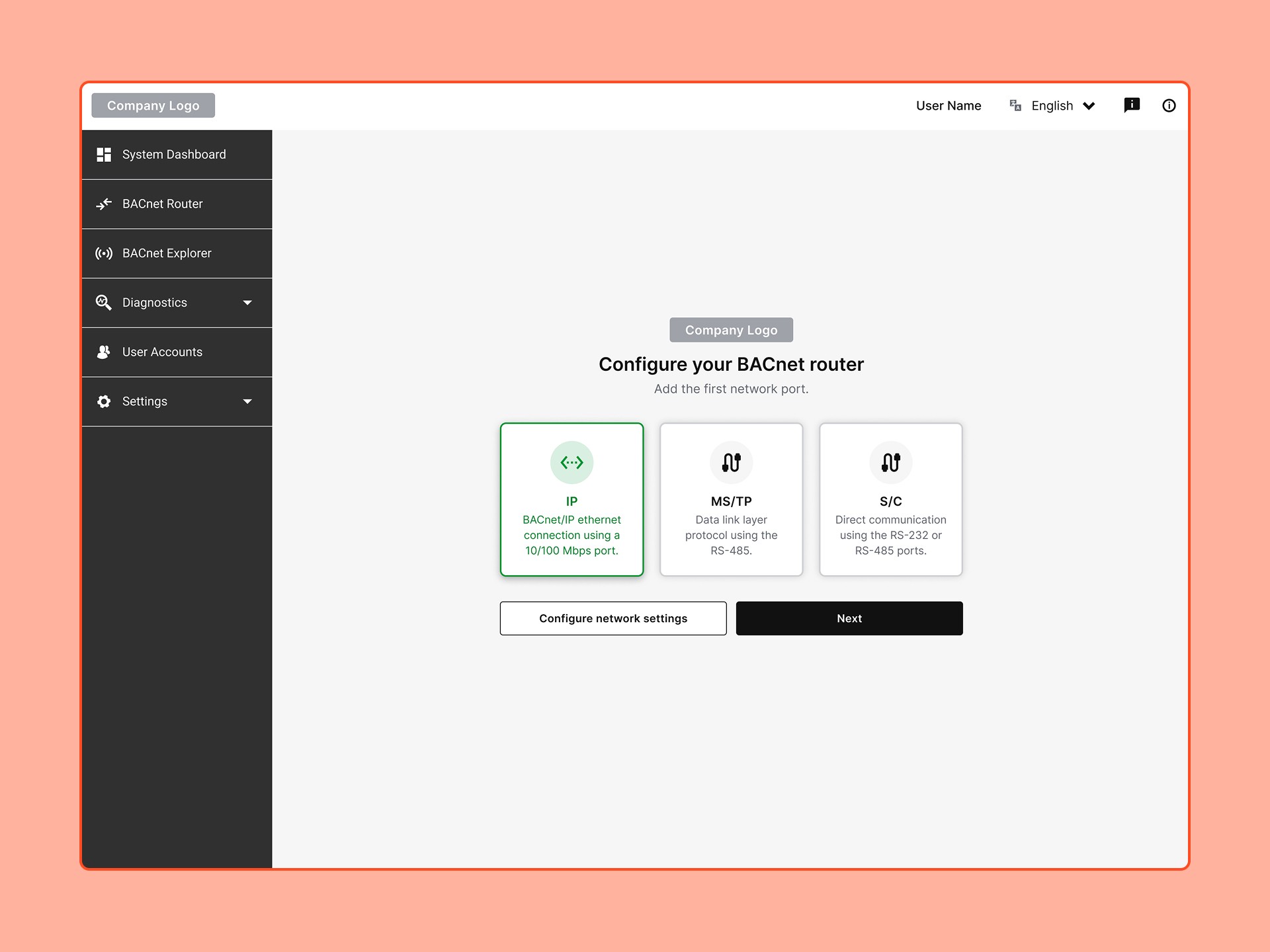
Users choose the path that they want to take to set up their first network port, and the system guides them through the configuration process step-by-step with prepopulated fields and sufficient help.
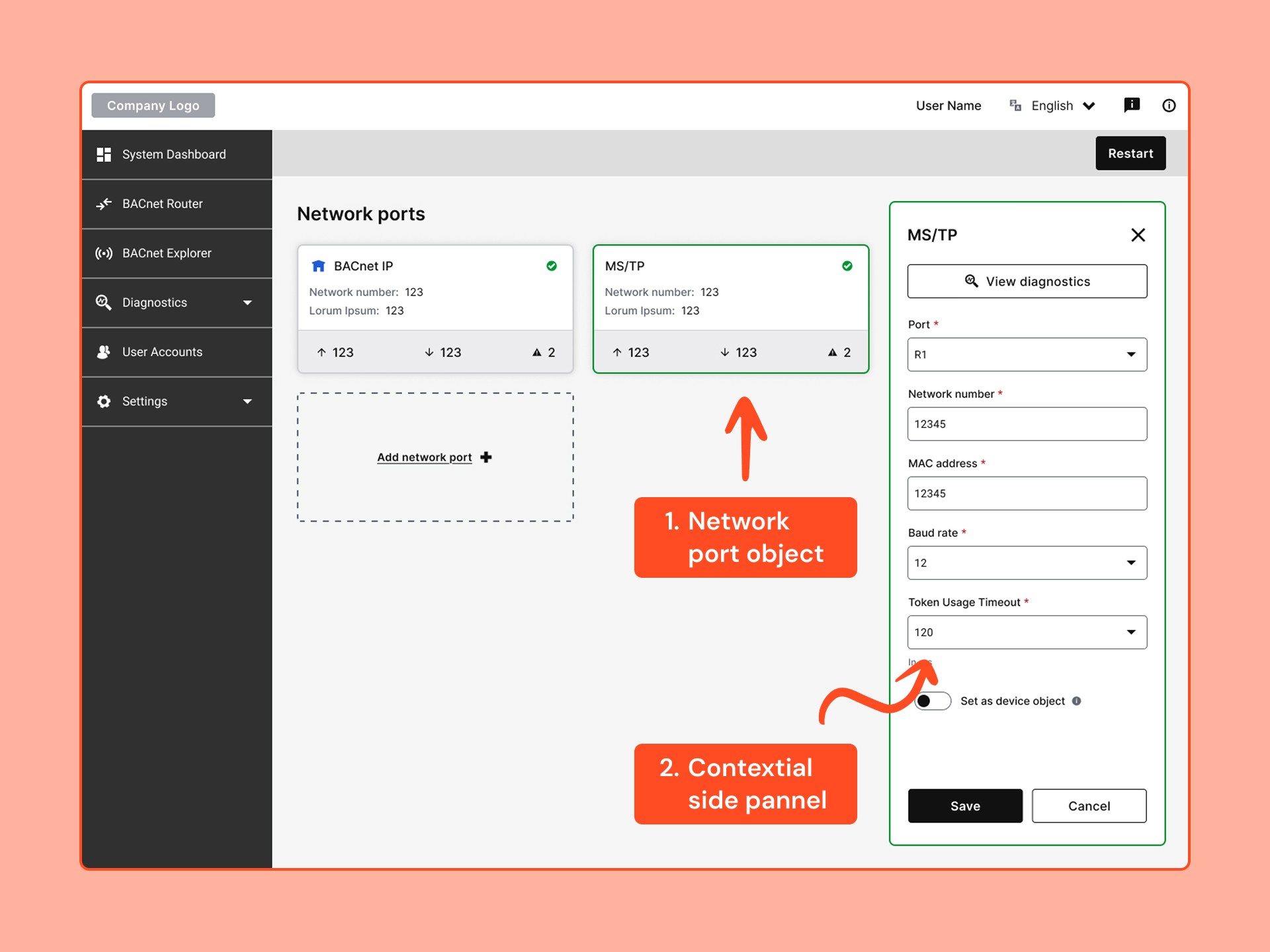
Once users have configured a network port, it gets shown as a card on the home page.
The card design finally makes it responsive and supports technicians' "physical objects" mental model.
For the first time, users can also see basic analytics (Tx, Rx, Errors) in the grey section at the bottom so that they can easily confirm that the configuration was successful.
I used a persistent side panel that allows users to compare values between the cards and contextual settings or data that’s in the side panel. In this case, the network port card was selected, and the side panel shows its details with a button to view more diagnostic data.
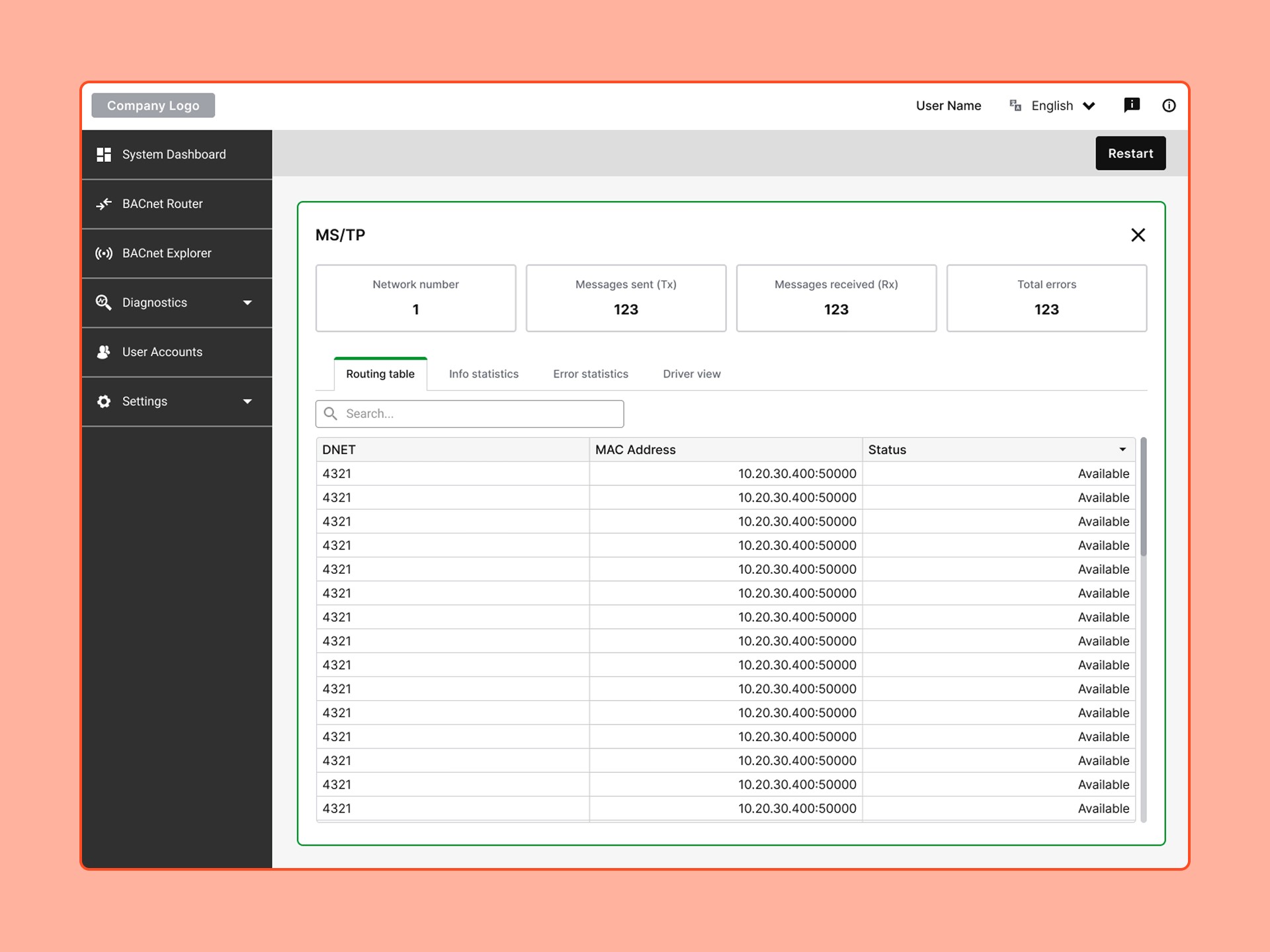
When users click on the “View diagnostics” button in the side panel, the panel expands to fill the screen with vital diagnostics data that was very hard to get access to in the past.
Step 4: Iteration...
These designs served as important conversation starters to help the rest of the team finalise requirements and continue building the software in the next couple of weeks while I helped with implementation.
There wasn't time to do usability testing with external users, but by designing in close collaboration with our engineers, who were also users of this technology, we had enough confidence to begin production and make updates once users start using it in the field.